Automate – The Best Free Android App for Task Automation
Automate is a free and flexible Android app for automating actions using a visual editor, without writing any code.
What is Automate?
Automate uses a visual approach to programming, which sets it apart from similar-purpose apps such as IFTTT, Tasker, or MacroDroid. The app was developed by LlamaLab and follows a freemium model, meaning that purchasing the premium version removes the limitations of the free one.
With Automate, you can automate nearly every aspect of your Android device. Automation is achieved through a method called a flow. Each flow consists of multiple blocks. Blocks represent individual actions, conditions, or functions. They are connected by lines, which determine the execution path.
Automate offers a library of nearly 400 blocks, including the following:
- Uploading, deleting, and automatically sending files
- Controlling Wi-Fi, Bluetooth, and mobile data
- Sending and receiving SMS messages
- Determining GPS location
- Launching applications
- Detecting calls and notifications
- Conditional and other control structures (IF, WHILE, FOR)
The app does not request permissions in advance; rather, each flow requires specific permissions based on the system functions it uses. All data is stored locally, which is a more secure method compared to using cloud solutions. Automate also supports plugins and can integrate with apps like Dropbox, Tasker, and IFTTT.
The app includes a section for sharing and downloading flows created by the community. If the device is rooted, it’s possible to use ADB commands, further expanding the number of potential actions.
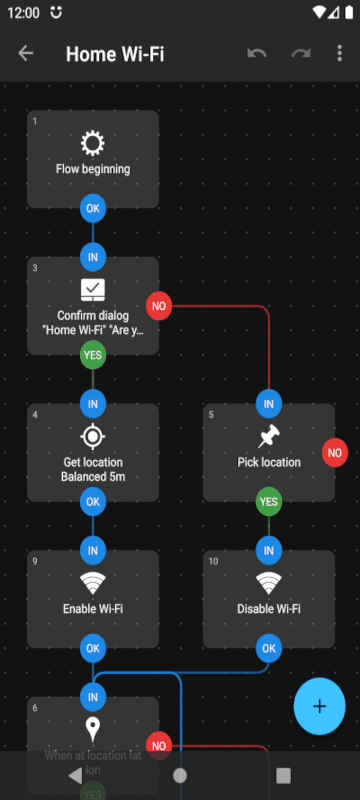
Automate in Practice
Automate is an app that enables mobile device programming without the need to write any code. It’s suitable even for beginners because it uses a visual programming approach, which is intuitive. Users simply drag and connect blocks with lines to build logical structures. The visual representation of blocks and lines allows users to understand the execution logic via flowcharts. Learning the app is further supported by a wide range of flows shared by other users.
There are many use cases (flows), including:
- Turning Wi-Fi on or off under specific conditions
- Switching to silent mode when entering the office
- Removing notifications while driving
- Sending a message upon arriving home when connected to your Wi-Fi
The free version is limited to 30 blocks per flow, which partially restricts more complex flows. There is no web or desktop version of the editor — everything is done on the mobile device. An iOS version is still not available.
Compared to Tasker, Automate is less powerful, but unlike Tasker, it offers a free version with many features. The app requires Android 5.0 or newer to work.
Automate is a stable and relatively secure app. It doesn’t demand much from your hardware and doesn’t drain your phone battery. It’s a great app for users who want to experiment and get the most out of their device.
Platform:
Android

Rate:
 (No Ratings Yet)
 Loading...